
Download Free VOB to MP4 Converter – Fast, Secure & Free Video Converter
Overview: What Makes Free VOB to MP4 Converter Stand Out?
Free VOB to MP4 Converter is a lightweight, free‑of‑charge utility designed specifically for Windows users who need to transform DVD‑based VOB files into the universally compatible MP4 format. The tool targets anyone with a growing digital DVD library who wants to watch movies on modern devices such as smartphones, tablets, or smart‑TVs without sacrificing visual fidelity. By preserving the original audio‑video quality while repackaging the file into a smaller, more manageable container, the converter eliminates the hassle of hunting down third‑party codecs or dealing with bulky VOB files that many mobile players simply cannot read.
Built on a straightforward user interface, the program lets you drag‑and‑drop files, select a destination folder, and start the conversion with a single click. The software runs on a wide range of Windows editions—from Windows 7 up to Windows 11—ensuring that both legacy and newer systems can benefit from its capabilities. Because it’s free, there’s no hidden subscription, no trial period, and no watermarks on the output files. The developers have also emphasized security; the installer is signed, and the program does not contain adware or spyware, giving users peace of mind when downloading from the official site.
In practice, the converter shines when you need to quickly rip a DVD collection for offline travel, create backups for archival purposes, or simply share a favorite movie with family members who only have mobile devices. Its speed is notable—thanks to multi‑threaded processing, most standard‑definition titles finish in under five minutes, while high‑definition content still converts within a reasonable timeframe. The combination of speed, quality retention, and zero cost makes Free VOB to MP4 Converter a valuable addition to any home media toolkit.
Key Features & Benefits
- One‑Click Conversion: Drag a VOB file, choose an output folder, and click “Convert” – no complex settings required.
- High‑Quality Output: Retains original video resolution and audio bitrate, ensuring the MP4 looks and sounds just like the source DVD.
- Broad Windows Compatibility: Works on Windows 7, 8, 8.1, 10, and 11 (both 32‑bit and 64‑bit).
- Batch Processing: Convert multiple VOB files simultaneously, perfect for large DVD collections.
- Fast Encoding Engine: Multi‑core CPU utilization speeds up conversion without compromising quality.
- Lightweight Installer: Small download size (< 5 MB) and minimal system footprint.
- Secure & Ad‑Free: No hidden fees, no bundled software, and regular updates from the developer.
- Device‑Ready MP4 Files: Output is compatible with Android, iOS, Windows Media Player, VLC, and most smart‑TV apps.
The feature set is deliberately kept simple to avoid overwhelming users who just want a reliable conversion tool. While advanced users might miss granular controls such as bitrate tweaking or subtitle embedding, the program’s primary goal is to deliver a hassle‑free experience. The batch processing capability, for example, saves time for users who need to convert entire DVD folders at once. Moreover, the software automatically selects the optimal MP4 codec based on the source file, meaning you rarely have to intervene to achieve the best result.
Another notable benefit is the program’s focus on preserving the original DVD experience. Unlike many free converters that downscale video or strip surround‑sound channels, Free VOB to MP4 Converter maintains the original audio tracks, including Dolby Digital when present. This attention to detail is essential for cinephiles who value the full cinematic soundscape. In addition, because the MP4 container is widely supported, the resulting files can be played on virtually any modern device without the need for additional plugins or codecs.
Installation, Usage & Compatibility Guide
Step‑by‑Step Installation
- Visit the official website and click the “Download Free VOB to MP4 Converter” button.
- Run the downloaded
.exeinstaller. Windows will prompt you to confirm the installation—accept the UAC request. - Follow the on‑screen wizard: agree to the EULA, choose an installation folder (default is fine for most users), and click “Install”.
- Once installation completes, launch the program from the desktop shortcut or Start menu.
How to Convert a VOB File
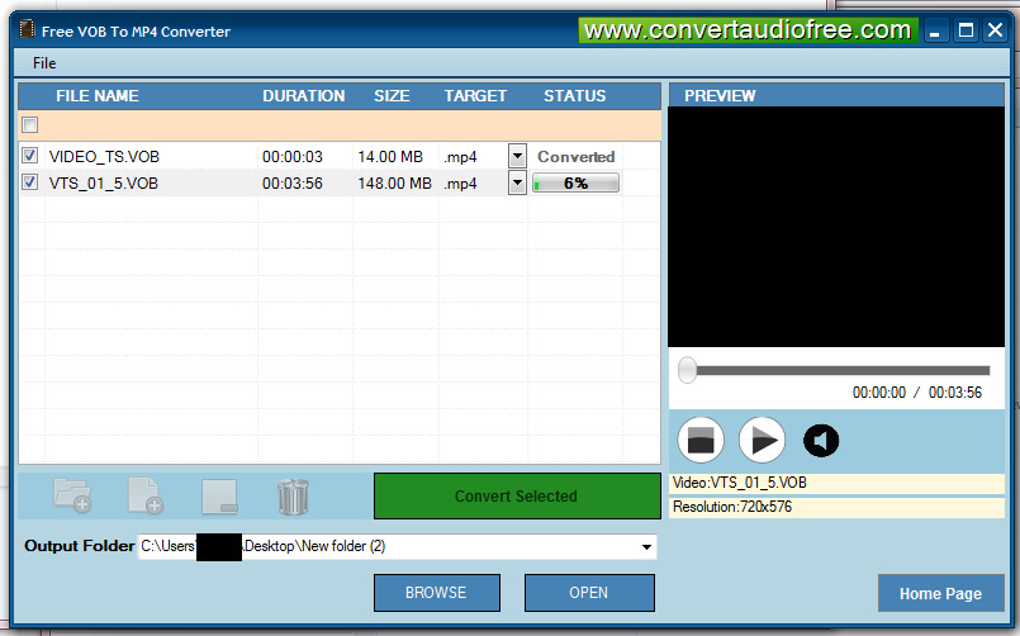
After launching the application, you’ll see a clean window with three main panels: Source, Destination, and Controls.
- Import Your VOB: Click the “Add File” button or simply drag the VOB file from Windows Explorer into the Source panel.
- Select Output Folder: Click “Browse” under Destination to choose where the MP4 will be saved.
- Start Conversion: Press the bright green “Convert” button. A progress bar will display real‑time status, and you can pause or cancel if needed.
- Verify Output: Once finished, a notification appears. Click “Open Folder” to preview the MP4 on your preferred media player.
Compatibility and System Requirements
Free VOB to MP4 Converter runs on all mainstream Windows operating systems, including Windows 7, 8, 8.1, 10, and 11. It supports both 32‑bit and 64‑bit architectures, though a 64‑bit system is recommended for faster batch processing and optimal memory handling. Minimum hardware requirements are modest: a 1 GHz CPU, 512 MB RAM, and 50 MB of free disk space for installation. For best performance, especially with high‑definition VOB files, a multi‑core processor (dual‑core or higher) and at least 2 GB RAM are advisable.
The program does not require any additional codecs, as it bundles the necessary MP4 encoder internally. This eliminates the need for separate codec packs and reduces potential conflicts with other media applications. If you encounter any playback issues on a specific device, the generated MP4 files can be further optimized using free tools like HandBrake, but in most cases they will work straight out of the box on Android, iOS, Windows, macOS (via VLC), and popular smart‑TV platforms.
Pros, Cons & Frequently Asked Questions
Pros
- Completely free with no hidden fees or trial limitations.
- Fast conversion using multi‑threaded processing.
- High‑quality MP4 output that retains original audio tracks.
- Simple, intuitive UI suitable for beginners.
- Batch conversion saves time for large DVD libraries.
- Secure installer—no adware or unwanted bundles.
Cons
- Lacks advanced settings such as custom bitrate or subtitle embedding.
- Only available for Windows; no native macOS, Linux, Android, or iOS version.
- No built‑in video editing features (cutting, merging, etc.).
FAQ – Answers to Common Queries
Can I convert VOB files from a Blu‑ray disc?
Free VOB to MP4 Converter is optimized for DVD‑based VOB files. Blu‑ray content usually comes in MKV or ISO formats, which require a different conversion tool.
Is there a limit to the number of files I can convert at once?
There is no hard limit. The batch queue can handle dozens of files, but conversion speed will depend on your CPU and RAM.
Will the conversion process remove subtitles?
The free version does not extract subtitle tracks. It focuses on video and audio streams only. For subtitle support, consider a more advanced converter.
Do I need an internet connection to use the software?
No. After the initial download and installation, the converter works entirely offline.
Is the output MP4 compatible with iPhone and Android phones?
Yes. The MP4 files are encoded using H.264 video and AAC audio, which are natively supported by iOS, Android, and most mobile media players.
Conclusion & Call to Action
Free VOB to MP4 Converter delivers exactly what its name promises—a quick, reliable, and completely free way to turn DVD VOB files into universally playable MP4 videos. Its minimalistic design, fast conversion engine, and commitment to preserving original quality make it an excellent choice for anyone looking to modernize an existing DVD collection without spending money on expensive software suites. While power users may crave deeper customization, the core audience—home users, travelers, and casual media enthusiasts—will appreciate the straightforward workflow and zero‑cost model.
Ready to enjoy your favorite movies on the go? Download Free VOB to MP4 Converter now, follow the simple installation steps, and start converting in seconds. Remember to keep the software updated for the best performance and security. Happy converting!
Overall Rating: 4.5/5
Pros: Free, fast, high‑quality output, batch support.
Cons: No advanced bitrate control, Windows‑only.







